
Banner artwork by vectorfusionart / Shutterstock.com
Executive summary
In-house Legal and Legal Ops teams often struggle to quantify their value and manage costs due to activity data scattered across unstructured email, file directories, and various CRM tools.
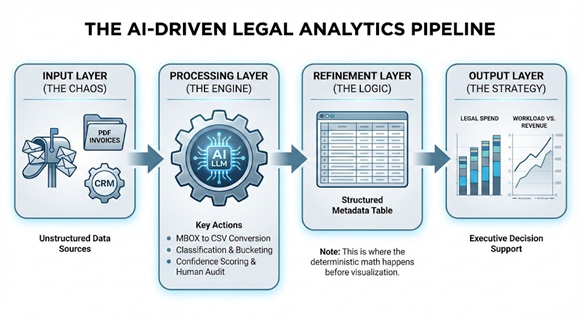
This article explores how to utilize AI tools to analyze Legal Spend, Email Mailbox Activity, and Contract/Task Database Exports to quantify work done, predict future trends and resource needs, drive spend efficiency, and demonstrate data-driven strategic planning.
Executive cheat sheet: Transforming legal chaos into strategy
Audit the "Black Hole": Use enterprise-grade AI to extract and classify metadata from legal email aliases (e.g., legal@) to transform raw email volume into structured task data.
Follow the digital paper trail: Automate the breakdown of legal invoices by vendor and category to distinguish "run-the-company" operational costs from "protect-the-company" litigation or fundraising spend.
Justify with data: Correlate legal task volume with company-wide growth metrics, such as revenue (ARR) and headcount, to build a data-backed narrative for resource and budget requests.
Operationalize insights: Identify high-volume, low-complexity activities (like routine NDAs) through AI analysis to implement self-service portals and pivot the legal team toward higher-value strategic work.
Target audience, technology stack, and industry relevance
The audience here is small (~10 to ~100 employees) to medium (~1000 to 1500 employees) size in-house legal departments where specific legal invoicing tools may not yet have been implemented, and where legal task tracking may occur via general tools (email, spreadsheets, Jira, etc.) or even structured contract database tools with limited reporting capabilities. For organizations of this size the legal operations function may be nascent and often a part-time role within the legal team.
This article is based around GSuite based tools as those are commonly used in the small to medium company environment, but is equally applicable to Microsoft and other productivity suites connected to AI tools.
This article aligns with established legal operations frameworks such as the ACC Legal Operations Maturity Model 2.0 and the CLOC Core 12, relating to business intelligence, financial management, metrics and analytics, technology management, and strategic planning and legal operations leadership.
AI is not a “magic wand” to change results overnight, but rather akin to a battery-power tool which takes a while to learn to operate safely, and when mastered greatly enhances productivity and speed over use of a manual hand-tool. For legal departments who are just starting on their AI adoption journey, they should factor in a learning period of three to six months while getting ramped up on AI utilization and familiarity with the technology. Such legal teams should “start small” on tangible projects with visible impact to demonstrate quick wins (e.g., NDA automation) prior to going all-in on digital transformation across the legal department. Team members should be taught that AI is a tool just like any other to improve their workflow, and be trained in how to use it safely and effectively to enhance their roles.
Team members should be taught that AI is a tool just like any other to improve their workflow, and be trained in how to use it safely and effectively to enhance their roles.
Section 1: “Follow the money” — Legal spend and cost reporting
This section focuses on automating the breakdown of legal invoices to identify where every dollar is going, and to automate both quantitative and visual reporting of spend.
Note: For purposes of this example, we will assume a master directory (Legal Invoices) which has invoices separated out into sub-directories by vendor. The prompts used in this example may be run (for example, in Google Gemini) starting in the master directory.
It is necessary to classify the buckets of spend into which we want invoices tracked. These buckets can include:
- Example categorization buckets:
- Litigation: Any Litigation related invoices. They may also be separated out by Litigation topic.
- Corporate: Any corporate counsel invoices, Board related legal spend.
- Fundraising: Any expenses related specifically to fundraising rounds.
- Entities: Any invoices for setting up or managing global entities, and must ensure all amounts are converted to USD
- Employment: Any invoices related to regular employment, immigration, etc. matters.
- GTM: Any invoices related to supporting sales
- Procurement: Any invoices related to supporting direct or indirect procurement
- Privacy/AI: Any invoices related to Privacy and AI governance matters.
- Intellectual Property: Any invoices related to patent and trademark filing and prosecution matters.
- Legal Tech: Any invoices related to legal-specific tools e.g. legal contract repository, export compliance screening tool, contract redlining tool, etc.
- Example output formats:
- Total spend by bucket: A high-level spend overview showing total spend for the financial year to date, by bucket category.
- Monthly spend trends: Tracking spend as monthly amounts to identify seasonal spikes.
- Stacked category analysis: Visualizing spend by broader categories (e.g., "Normal Operation" vs. "Litigation" vs. “Fundraising”) to see how much regular (and hopefully predictable) "run-the-company" spend differs from atypical (and often unpredictable) "protect-the-company" or “fundraising” spend.
- Impact: By shining a light on specific spend categories, it permits the legal team to identify areas for optimization.
- Migrating categories of work in-house rather than have it performed externally;
- Automating document preparation or matter analysis to save on external counsel spend; and
- Potentially identifying redundant or duplicative activity across external vendors and firms.
One of the benefits of AI is the ability to parse data, and calculate and present spend both in tactical detail (what areas is legal spending on, and at what cadence) but also at a strategic level (show my legal team’s spend as a percentage of revenue). AI also permits rapid benchmarking (using reliable benchmark data such as that from ACC or CLOC, compare my legal team’s spend against similarly situated organizations).
This provides valuable comparison data for budgeting discussions with CFOs, and also for headcount and resource planning with Talent teams. For example, if external legal spend crosses a threshold of half of all legal spend, or external spend crosses ~0.5 percent of revenue, then legal leadership can make a clear case for bringing headcount and work in-house to save money.
Important note regarding using LLMs for financial analysis:
- AI-generated financial calculations are not authoritative or “hard facts.”
- AI produced output is the “first draft” and a human must always review and give the “final word” on use of AI generated data. The benefit is that AI can rapidly parse and visualize large amount of data and can be re-run easily as required when the underlying data set (invoice folder) changes.
- This LLM-based spend analysis is probabilistic, not deterministic. So, while extremely useful from a visualization perspective and for classification of spend types, the source of truth for Board or financial reporting should be from your finance system of record.
- Any visualizations generated by LLMs should be verified against the finance system of record prior to formal use. As a sanity check, it is recommended to conduct a manual audit of the LLM invoice analysis on first use and periodically (e.g., quarterly) thereafter.
- It is recommended to use the LLM to categorize the spend buckets and export them to a spreadsheet, and conduct the final analysis (or sanity check) using the native spreadsheet calculations. Specifying use of LLM Advanced Data Analysis/Code Interpreter function in your analysis prompt can improve mathematical calculations.
Section 2: Mailbox intelligence
Problem statement:
Many legal departments use one or more legal related aliases to serve as a front-door or intake channel for legal requests. Other tools (Slack, Teams, Jira, etc.) may also be used, but this section will focus on the more traditional email which virtually every company uses for legal tasks.
The problem is that while the legal alias is the source of truth in terms of what requests/activity are occurring, it is often a "black hole" with limited ability to extract structured intelligence from the alias. This section details how to extract mailbox metadata, classify activities and tasks, and audit this information to understand service levels, task volume, and potential future support needs.
Aliases establish email structure
If your company does not yet have separate email aliases for different legal functions, you may consider setting those up (using Google Groups) as it makes it easier to separate out specific types of requests by subject and search or route them differently. It is also helpful to set up the Google Groups to provide a daily digest of emails coming into each alias, as this increases visibility of the email inbox for your AI tools.
Common email aliases may include:
- legal@ — for any type of legal request, commonly used by Sales/GTM teams for deal related items;
- privacy@ — for any type of request relating to personal information, including external requests for unsubscribe, data subject access requests, data deletion, etc.; and
- patents@ — for patent related request or invention ideas, commonly used by R&D teams.
Other teams (HR, Finance, etc.) may maintain their own requests. The analysis techniques described here also work well for any mailbox type.
Extracting information from legal aliases and other communications channels
Ideally, it is recommended to use an enterprise-grade SaaS-connected AI search, assistant, and agentic tool that can directly access your legal email aliases and mailboxes and other data sources such as CRMs, chat (e.g., Teams or Slack) via API, in a way that respects permissions and access controls to protect the confidentiality and privacy of the underlying data. Such an enterprise-grade tool should also provide data residency (regional data hosting), and high context and relevance for any information sources used for AI analysis, which greatly improves the quality and utility of AI outputs.
Many enterprise LLMs now have "Data Connectors" that can ingest Gmail/Outlook aliases directly without the need for a direct upload of data. Recognizing that not all users presently have such a SaaS-connected tool or LLM in place, as a starting point the article below outlines ways of accessing email-based legal mailbox data to present a variety of options to the reader and implementer.
Converting the mailbox to an AI-searchable format
Note: This step may require IT technical support, so it is recommended to coordinate with your IT team as required. As an alternative, low-code or no-code tools may also provide useful mechanisms for this step.
If you are inheriting a legal organization that does not have organized task data for reporting purposes, or which has incomplete data, then a direct analysis of the emailed task requests coming into the legal team can shed valuable light on the legal department’s historical activities. This step requires access to the actual emails themselves, either via a data connector, or directly typically in a CSV or spreadsheet table format for analysis. If you are unable to access such a CSV file, then your IT team should be able to help with this. You can request IT to export the full email text for a detailed review, or just the metadata (Subject, To, From, Date, CC, Forward, etc.) for a summary review, and then converting it to a CSV output table. Once you have the emails as a CSV file you are ready to start the analysis.
LLM context limitations:
It is important to note that LLMs have a certain “context window” size which limits how much data the LLM can “keep in its brain” when processing a certain task. Hence it is advisable to break large (e.g. over 5MB) CSV files into smaller portions (e.g. by financial quarter rather than by full year) if the LLM hits context window limits. Each model differs in capabilities and context window.
Structure the data: Define the emails categories and actors
The next step is to define what tasks you want to categorize the legal activity into. These tasks may generally align with the spend categories of the first part, or may be more granular in nature.
- Defining legal team members: Who is in your legal team (current and former)?
- Defining request types: What categories of legal tasks do you want to report on?
- Defining ignored emails: What categories of emails do you want to ignore (e.g. automated e-signature emails or automated response acknowledgements)
- Define outliers: What data points do you want to exclude (e.g. slowest 5 percent or 10 percent) as they may not be reflective of typical legal activity.
- Force match: For any “general” category request, do you want to force match them to one of the categories of legal tasks? This can be helpful where there is a high volume of requests marked “general” or of undefined type, so there can be at least an attempt to categorize them by task type. For any forced match, the LLM should provide a confidence score of the match to enable users to verify if the classification is correct, and potentially flag for human review if the confidence level is below 80 percent (for example).
Process the data: Specify the analysis and outputs
Now that you have the structure defined, you need to tell the LLM what you want it to analyze from the mailbox. These may include:
- Volume of legal requests by month;
- Category of legal tasks incoming;
- Engagement with legal tasks i.e. who is active in responding to the mailbox;
- Response time to legal tasks in business days;
- Workload trendline and future forecast (speculative, for directional use only); and
- Headcount trendline and future forecast (speculative, for directional use only).
Important Note: All of these analyses are approximations as LLMs are by nature probabilistic functions, and are not deterministic. So, while the data is generally correct based on how the LLM interprets the email content, it should not be treated as authoritative or 100 percent correct.
Visualize the data: Specify how it is presented
One of the benefits of AI based tools is that it is easy to request that data be visualized in many different ways or “slides”, and this generation can be automated so a person does not need to create multiple spreadsheet files, build pivot tables, and manually create graphs based on those pivot tables.
Once you have specified the structure, analysis, and output desired from your data, it is very quick to run that set of prompts on a dataset you upload or point the LLM tool at.
The author has found that bar and stacked bar charts are effective for presenting spend, workload, and other legal activity at an executive level, but of course individual preferences may vary. By using prompts to generate the charts, it is straightforward to generate and modify visual presentations on the fly using natural language. For example, heatmap diagrams are helpful for showing busy areas or topics, and Sankey diagrams are helpful for showing request flows.
By using prompts to generate the charts, it is straightforward to generate and modify visual presentations on the fly using natural language.
Outcomes and actions from the analysis
Having the data is key to understanding team activity, but the key value is identifying impact and operational savings that can be implemented. For example, if 40 percent of the legal work relates to NDAs, the legal team may implement a self-service NDA portal with a limited number of pre-approved options to select (e.g., choice of law, confidentiality term, technical scope) which would smooth the NDA process and reduce the legal review burden.
Section 3: Reporting on CRM tasks and contract analytics
The first and second section above addressed unstructured spend (in folders) and unstructured email (mailbox) data sources. This next section will address structured data sources (e.g. a CRM or contract database tool) where the user may wish to do more in-depth analysis using natural language.
One of Legal’s primary tasks is supporting revenue and deals, the commercial details of which typically reside in a CRM platform. If Legal has established a contract database, then the contracts relating to those deals typically live in the database. In some scenarios Legal may build tables within the CRM pulling over relevant contract details from the contract database.
For purposes of analysis using LLMs, Legal will need the ability to export (as a CSV or Excel file) the contents of the CRM and/or contract database. Your IT or CRM administrator can generally assist with enabling this export functionality, and it will typically reduce subsequent requests to the IT/CRM team.
Where this combination of data sources gets interesting is that it permits reporting of Legal task activity in the context of revenue, headcount, number of deals, by geography, or other relevant factors. The analysis is only limited by the data elements made available in the CRM tables or contract database fields.
For example, one very helpful chart for fast growing companies is to track the number of legal sales-related tasks on one axis, and the revenue/ARR is on another axis. This tracks the volume of legal sales activity in the context of revenue growth.
Another helpful chart is to track the number of legal overall tasks on one axis, and the company headcount on another axis. This tracks overall legal workload in the context of company employee count.
Other variations are possible, for example:
- Analyzing the number of product counseling or patent related tasks in relation to the overall R&D employee count.
- Analyzing the number of employment related tasks in relation to the overall employee count.
- Analyzing the number of corporate related tasks in relation to global entity growth or new markets entered.
- Analyzing the level of legal activity by category of customer: e.g. segment by Strategic, Enterprise, Commercial, SMB, Fed/SLED, Channel Partners, etc.
- Analyzing the level of legal activity by geography (NAMER, LATAM, EMEA, DACH, APJ, etc.)
- Analyzing the level of legal activity by CRM pipeline stage (generally most legal activity is observed in stages 6-8 of a typical 8-stage CRM pipeline).
Preserving data security, privacy, and privilege during AI acceleration
When using any AI tool, it is important to take steps to protect data security, privacy, and legal privilege. In general:
- Any prompts or legal-related files shared to AI tools should be overseen by attorneys as part of a legal analysis.
- The logs and results of these prompts should be treated like legal documents, and protected appropriately with access controls and confidentiality labeling.
- Output of AI tools used specifically for legal analysis should be used for legal purposes.
When using any AI tool, it is important to take steps to protect data security, privacy, and legal privilege.
Further to protect confidentiality and privilege, it is recommended to avoid consumer-grade AI tools and rather use an enterprise-grade AI tool that has security, privacy, and access-control permissions at the core. In particular, such a tool should have a “no-train, no-retain" commitment with assurance that data or prompts entered by a user will not be used to train models and not used for the benefit of anyone but the user.
Conclusion: From cost center to strategic partner
The true value of this approach isn't just saving time on reporting. It’s repositioning Legal in the business, and communicating in terms the business understands. Instead of justifying headcount with anecdotes, you present data. Instead of defending spend, you demonstrate strategic resource allocation. Instead of reacting to growth, you proactively forecast capacity needs.
This data-driven approach transforms Legal from a cost center defending its existence to a strategic function demonstrating its value. When the CFO asks, "Why do you need another lawyer?" you can respond with data: "Task volume is up 60 percent while our team is flat, here's the trend line, here's when we'll hit capacity constraints."
Using AI with your data empowers legal leaders to communicate clearly by speaking the language of headcount, revenue, and capacity planning. This changes the conversation, and positions Legal as a strategic partner rather than a cost center.
Disclaimer: The information in any resource in this website should not be construed as legal advice or as a legal opinion on specific facts, and should not be considered representing the views of its authors, its authors’ employers, its sponsors, and/or ACC. These resources are not intended as a definitive statement on the subject addressed. Rather, they are intended to serve as a tool providing practical guidance and references for the busy in-house practitioner and other readers.